Destroyer Experience

Dedicated Servers Explained Plus Pros and Cons

By destroyerexperience

In today’s digital age, businesses need reliable and efficient web hosting solutions to ensure their online presence is robust and secure. One of the most powerful options available is dedicated server hosting.

This type of hosting provides businesses with a server entirely dedicated to their website, offering unparalleled performance, security, and control. Understanding the benefits and features of dedicated servers can help businesses make informed decisions about their hosting needs.

What is a Dedicated Server?

A dedicated server is a physical server exclusively allocated to a single client. Unlike shared hosting, where multiple websites share the same server resources, a dedicated server provides all its resources to one client. This means that the client has full control over the server’s configuration, software, and security settings.

Dedicated servers are ideal for businesses with high traffic websites or those requiring extensive resources. They offer superior performance, reliability, and security compared to other hosting options.

Benefits of Using Dedicated Servers for Businesses

Dedicated servers offer numerous benefits for businesses. One of the primary advantages is enhanced site performance. With dedicated resources, websites can handle high traffic volumes without experiencing slowdowns or downtime. This is crucial for businesses that rely on their website for sales and customer engagement.

Another significant benefit is improved security features.

Dedicated servers provide a higher level of security compared to shared hosting. Businesses can implement custom security measures, such as SSL certificates, DDoS protection, and regular backups, to protect their data and ensure compliance with industry standards.

Additionally, dedicated servers offer greater control and customization. Businesses have root access to the server, allowing them to install and configure software as needed. This level of control is not possible with shared or VPS hosting. Furthermore, dedicated servers often come with an uptime guarantee, ensuring that websites remain accessible to users at all times.

While dedicated servers can be more expensive, there are always sites that keep coupon codes current for the top hosting companies where you can save money.

How to Choose the Right Server for Your Business

Selecting the right dedicated server for your business involves considering several factors. First, assess your resource requirements. Determine the amount of bandwidth, disk space, and RAM your website needs to function optimally. This will help you choose a server that can handle your traffic and data storage needs.

Next, consider the server location. The physical location of the server can impact your website’s loading speed and performance. Choose a server located close to your target audience to ensure fast and reliable access to your site.

Another important factor is the control panel. Look for a server that offers a user-friendly control panel, such as cPanel, to manage your server settings and configurations easily.

Additionally, consider the level of customer support provided by the hosting provider. Reliable technical support is essential for addressing any issues that may arise.

Evaluate the pricing plans and features offered by different hosting providers. Compare the costs and benefits of various plans to find one that fits your budget and meets your business needs.

Cost Comparison: Dedicated Servers vs. Shared Hosting

When comparing the costs of dedicated servers and shared hosting, it’s essential to consider the value each option provides. Shared hosting is generally more affordable, making it an attractive option for small businesses or personal websites with limited budgets. However, it comes with limitations in terms of performance, security, and control.

Dedicated servers, on the other hand, are more expensive but offer significant advantages. The higher cost is justified by the enhanced performance, security, and customization options.

Businesses with high traffic websites or those requiring extensive resources will benefit from the investment in a dedicated server.

To illustrate the differences, here is a comparison table highlighting key features:

Feature Dedicated Server Shared Hosting
Performance High Moderate
Security Advanced Basic
Control Full Limited
Cost Higher Lower

While dedicated servers have a higher upfront cost, the long-term benefits often outweigh the initial investment. Businesses should carefully evaluate their needs and budget to make an informed decision.

Security Advantages of Dedicated Servers

Security is a critical concern for businesses, and dedicated servers offer several advantages in this area. One of the primary benefits is the ability to implement custom security features. Businesses can configure their server to meet specific security requirements, such as installing SSL certificates and setting up DDoS protection.

Dedicated servers also provide isolation from other websites. Unlike shared hosting, where multiple websites share the same server, a dedicated server is used exclusively by one client. This reduces the risk of security breaches caused by other websites on the same server.

Additionally, dedicated servers offer better data protection. Businesses can implement regular backups and disaster recovery plans to ensure their data is safe and recoverable in case of an incident. The ability to customize security settings and implement advanced measures makes dedicated servers a preferred choice for businesses with sensitive data.

Scalability and Performance

Scalability is another significant advantage of dedicated servers. As businesses grow, their hosting needs may change. Dedicated servers offer the flexibility to scale resources up or down based on demand. This ensures that businesses can handle increased traffic and data storage requirements without compromising performance.

Performance is a key factor in the success of a website. Dedicated servers provide superior performance compared to shared hosting. With dedicated resources, websites can load faster and handle high traffic volumes without experiencing slowdowns. This is crucial for businesses that rely on their website for sales and customer engagement.

Moreover, dedicated servers often come with advanced hardware, such as SSD storage, which further enhances performance. The combination of scalability and high performance makes dedicated servers an ideal choice for businesses looking to grow and succeed online.

Managed vs. Unmanaged Servers: Which is Better?

When choosing a dedicated server, businesses must decide between managed and unmanaged hosting. Managed hosting includes comprehensive support from the hosting provider. This includes server setup, maintenance, security updates, and technical support. Managed hosting is ideal for businesses that lack the technical expertise to manage a server.

Unmanaged hosting, on the other hand, provides businesses with full control over the server. The hosting provider is responsible for the hardware, but the client handles all software installations, configurations, and maintenance. Unmanaged hosting is suitable for businesses with in-house IT teams or those with technical expertise.

The choice between managed and unmanaged hosting depends on the business’s needs and resources. Managed hosting offers convenience and peace of mind, while unmanaged hosting provides greater control and customization options.

The Wrap Up

In conclusion, dedicated servers offer numerous benefits for businesses, including enhanced performance, security, and control. By understanding the advantages and features of dedicated servers, businesses can make informed decisions about their hosting needs.

Whether it’s the superior site performance, advanced security features, or the ability to scale resources, dedicated servers provide a robust solution for businesses looking to succeed online.

When choosing a dedicated server, businesses should consider their resource requirements, server location, control panel, customer support, and pricing plans. Additionally, evaluating the differences between managed and unmanaged hosting can help businesses select the best option for their needs.

Overall, dedicated servers are a valuable investment for businesses that require reliable and efficient hosting solutions. By leveraging the benefits of dedicated servers, businesses can ensure their online presence is robust, secure, and capable of handling growth and increased traffic.
Filed Under: Digital Marketing

Best Email Software – What You Need to Know Before Choosing

By destroyerexperience

Are you looking for the best email software for your business? With so many options available, it can be difficult to know which one will be the best fit for your needs.

In this blog post, we’ll explore the key features and considerations to keep in mind when selecting the best email software for your business. We’ll also look at some of the top email software solutions available and provide an overview of each one. By the end of this post, you’ll have the knowledge and insight you need to make an informed decision on the best email software for your business. So let’s get started!

What are the main features of the very best email software platforms?

The best email software has features like automation, scheduling, spam filtering, encryption, data security, contact management, user interface, mobile accessibility, collaboration tools, customizable templates, email tracking, bulk emailing, email automation, analytics & reporting, cloud storage, calendar integration, task management, social media integration, third-party apps, and API integration.

All of these features are designed to help you get the most out of your emails and ensure your messages reach their intended recipient. Automation allows you to set up emails to be sent at specific times, making it easier to stay on top of deadlines.

These are just some of the main features of the best email software. With the right email software, you can ensure that your emails are delivered quickly, securely, and reliably. By utilizing these features, you can make sure that your messages reach the right people and get the results you’re looking for.

What are the benefits of using the best email software?

One of the main benefits of using the best email software is improved communication. With the right software, you can easily send and receive emails, as well as track who opened them and when. Automation features make it easy to send out bulk emails and automated responses, ensuring that your messages reach their intended recipient. Scheduling makes it easy to pre-schedule emails, so they arrive at the right time. This is especially useful for campaigns or newsletters. Spam filtering helps prevent unwanted emails from reaching your inbox. Encryption and data security can help protect confidential emails from being accessed by those who don’t have permission.

Another benefit of using the best email software is improved organization.

Contact management features make it easy to store contacts and keep track of their details. User interface makes it easy to navigate and use the email software. Mobile accessibility ensures that you can access your emails from any device.

Collaboration tools allow you to work with others on emails, as well as share documents and other files. Customizable templates make it easy to design and send emails with the same look and feel.

How Can I Make Sure I’m Using the Best Email Software?

When it comes to making sure you’re using the best email software, there are a few things you can do to ensure you’re getting the most out of your service. First, it’s important to familiarize yourself with the features and capabilities of the software. Knowing what the software can do and how it works will help you make sure you’re getting the most out of it.

Next, you should look for a software that offers the features and capabilities you need. Many email software programs offer a wide range of features, from automated scheduling to contact management, so make sure you find one that meets your needs. Finally, it’s important to read reviews and ask your peers who are using the software to get a better understanding of how it works.

Another way to make sure you’re using the best email software is to look for one that offers security features.

Security features such as encryption, spam filtering, and data security are important for keeping your emails safe and secure. Additionally, it’s important to make sure the software you choose is compatible with other applications and services. Many email software programs offer integrations with third-party apps, as well as cloud storage and calendar integration.

What Are the Best Practices for Using the Best Email Software?

First, you should make sure you’re using the software to its full potential. Many email software programs offer a wide range of features, from automated scheduling to contact management, so make sure you take advantage of all the features available.

Additionally, it’s important to stay organized and keep your emails organized. This means sorting emails into folders, setting up filters, and labeling emails for easy access.

Next, it’s important to stay on top of security measures. Many email software programs offer security features such as encryption, spam filtering, and data security. It’s important to make sure these features are enabled in order to keep your emails safe and secure. Additionally, make sure you’re using strong passwords and two-factor authentication to protect your data.

Finally, it’s important to make sure you’re using the software in the most efficient way possible. This means automating tasks, using tools such as bulk emailing and email tracking, and utilizing mobile accessibility. Additionally, make sure you’re taking advantage of collaboration tools, such as contact management and personalized URLs, and using resources such as analytics and reporting to get the most out of your software.

What Type of Customer Support Is Offered for the Best Email Software?

When it comes to the best email software, customer support is essential.

It’s important to make sure the software you choose offers the customer support you need to make the most out of your service. Many email service programs offer customer support in the form of a help center, online tutorials, and live chat. Additionally, some programs offer customer support via phone, so make sure you look for one that fits your needs.

Additionally, it’s important to make sure the customer support is available 24/7. Email is an essential part of communication, so it’s important to make sure you can get help when you need it. Additionally, many email software programs offer customer support in multiple languages, so make sure you look for one that supports your language.

What Types of Integrations Are Available?

When it comes to the best email software, integrations are an essential part of making the most out of the service. It’s important to make sure the software you choose offers the integrations you need to get the most out of your software. Many email software programs offer a wide range of integrations, from third-party apps to cloud storage and calendar integration. Additionally, some programs offer integrations with popular services such as Salesforce, so make sure you look for one that meets your needs.

Additionally, many email software programs offer integrations with social media platforms, such as Twitter and Facebook. This allows you to easily post, share, and comment on emails, as well as track performance and engagement. Additionally, many programs offer integrations with task management, contact management, and contact segmentation tools, so make sure you look for one that provides the integrations you need.

It’s important to make sure the software you choose offers integrations with popular APIs. This allows you to easily integrate the software with other services and applications, such as customer relationship management (CRM) and customer service systems. Additionally, many email software programs offer integrations with automated responses and automated follow-ups, so make sure you look for one that meets your needs.

Finally, you should look for custom domain integration. This type of integration allows you to create a custom domain for your email campaigns. You can use it to create a branded email address, as well as customize your messages and add logos and images.

By choosing the best email software with all of these integrations, you’ll be able to get the most out of your email campaigns and improve your overall customer service. So make sure to look for the right integrations when choosing the best email software for your needs.

Filed Under: Digital Marketing

Leads And Conversions- Is It All There Is With Digital Marketing?

By destroyerexperience

You’ve heard it before.

Traffic is the lifeblood to any business.

Then you’ve also heard – Leads and Conversions are all you should focus on.

So which is it?

That’s what I hope we can answer inside this detailed blog post.

While traffic is a given, not all forms of traffic are the same.

If we look, Eugene Schwartz talked about the 5 phases of customer awareness in his Breakthrough Advertising book from 1966.

The same holds true with marketing in today’s digital world.

Same principle applies. Different medium.

Sure there are tactics and hacks that you can apply to boost your conversions like the ones outlined by Neil Patel below.

Let’s instead get into the specifics of your traffic.

Where are they coming from?

What may seem like a weird question, it matters.

There are solo ads you can buy, traffic from Google, Facebook, and then there’s SEO.

According to this article, and I happen to concur with the author, all leads are not created equal.

You can go one step further and suggest that all traffic is not equal.

Going back to Schwartz levels of awareness, this applies to your traffic source.

For example, social media platforms are there to do what?

Socialize – correct?

Well, when we stick an ad in front of that audience.

We can only hope we’re targeting the right people based on the platform algorithms.

Often, that means nurturing, following up and building trust before we can ask for the sale.

Let’s compare that to someone making a search query.

With search, we can pinpoint the exact time with the exact product that will help the user.

In many of those instances, asking the user to jump through a series of indoctrination pieces or nurturing marketing funnel that you’d use with something like Kartra would be wasted opportunity.

Instead, when using a search campaign, its best to give the users what they’re looking for while systematically building your email list and tribe to diversify your income.

Filed Under: Digital Marketing

Do Solo Ads Work for Digital Marketing?

By destroyerexperience

There is one thing that you need to do to make more money online. Knowing this alone will help you generate more income compared to anything before. If you are new to internet business you must keep it in mind so that you find success fast, but before discussing that here are a few steps on earning more money through Solo Ads.

This post will help you understand how to generate a decent income using Solo Ads. With a step by step process you will learn how they work and how you can generate a successful stream of income through them.

If you plan to buy a solo ad to use for your list building efforts, then be sure integrate with Ask Method by Ryan Levesque to get optimum results.

What are solo ads?

Solo Ads are a common method that is used to drive traffic to websites. This is a highly cost effective way of doing so, thus generating a lot of demand out there by internet startups. 

When a website owner generates an email list of, let’s say 5000, he can sell solo ads guaranteeing a set amount of clicks to another website owner who needs traffic. For example when he guarantees 100 clicks, he puts a price on it and it is bought by website owners who want to drive 100 visits to their websites.

Once the package is bought, the owner of the list will send an email with the website link to his subscribers and these subscribers will be directed to the website once the link is clicked.

The problem with Solo Ads is, it involves a high subscriber churn rate. The person who owns the email list will see a rapid decline of subscriptions after each Solo Ad is sent.

This means that the email list has to be constantly upgraded and renewed by adding new emails.

Selling Solo Ads

You can sell Solo Ads on your own website; use Warrior Forum advertisements; or use any Social Network or forum which helps you promote things. Most website owners are looking to promote their websites using cheap methods such as Solo Ads. With a bit of effort you can easily find customers who are willing to pay money for the clicks.

SoloAdsX is also a place recommended to sell your Ads as it has many customers looking for ads there.

Reselling Solo Ads

As a reseller, you will be playing the role of a middle man. A website owner with a large amount of email subscriptions will put up clicks for sale. You can purchase these Solo Ads and resell them after adding your margin. 

Reselling is beneficial because you don’t need a huge investment to start. When developing your own subscriber list, you will need to invest immensely to promote the website and gather emails. You will have to spend more money to maintain the list at a certain number since the churn rate is high when Solo Advertising is done.

By being a reseller you won’t have to worry about these issues. Using the methods mentioned above on how to sell Solo Ads, you can make a decent profit in no time.

Selling solo ads is just like setting up any online business. Following the steps below will help you on effectively selling your Ads.

Find a need and solve it.

Don’t make the mistake of finding a product to sell first. This is a common mistake many newcomers make when getting into the internet business.First find a need, (like generating cost effective traffic for website owners) and solve that issue. 

You can identify current needs by doing the following.

  • Visit online forums and read the discussions by people to understand their needs
  • Do a research on keywords to see which keywords are being searched for
  • Analyze other Solo Ads sellers or resellers and identify their strategy

Write web copy that attracts sales

When selling Solo Ads on your website, you will have to convince customers as to why they should purchase from you. Writing an attractive web copy is the key to achieving this.

A good sales copy will arouse interest, describe the problem that you are solving and establish curiosity that will drive the customer to make the purchase. You also can consider outsourcing the writing to a freelancer who will charge a fee but do a great job.

If you are going to have a shot at writing the web copy, always write by looking at things in the customer’s perspective. This way you will be able to weave words that are convincing to the reader.

Use search engines and other methods to drive traffic to your website

Finding a way to drive traffic to your website will be your next task. You can use websites such as Facebook and post your website link on relevant groups. Although you won’t be able to post the links over and over again during the course of a day, you will be able to post the link on many groups to make people notice it. With a bit of discipline you will be able to drive significant traffic. 

Remember, creating awareness is everything. There is a demand for Solo Ads and you just need to make the right customer notice your website to drive sales.

Using Warrior Forum will help you advertise your website too. This is proven to be effective, but unless your advertisement hits the first page you might not make a single sale. Warrior Forum is full of potential customers looking for Solo Ads, but all of them click through ads that fall on the home page. Getting to the home page of Warrior Forum depends on luck, but it surely is worth a try.

Discipline

Remember the one thing that you need to do to make more money online? This is it. Discipline. It will make the difference of you making it or not, in the internet business. Just like anything in life, making money with Solo Ads isn’t easy, but its certainly easier when you integrate this method https://thinktanklab.com/ask-method-masterclass inside your marketing processes.

Initially you may not even make a single sale, but persisting with discipline will eventually get you there.

There are so many internet entrepreneurs who are making a significant income after 6 to 7 months of pure persistence. If you begin now, there is no way that you’ll be stopped from making more money than you think, though Solo Ads. 

Filed Under: Digital Marketing

Webinarjam Reviews – Does It Work?

By destroyerexperience

If you’ve been looking for the Webinarjam Review, then look no further.

This is a brand new, honest review of the popular webinar software along with the special 14 Day Trial pricing of the software.

Watch the review we found below as it gives a full demo of the software.

If you’re looking for a proven way to increase your reach, build your brand, while also building an email list, then I encourage you to check out the 60 Day Trial with Webinarjam

What is Webinarjam?

Webinarjam is a web based software application that allows you to conduct live webinars.

Webinars are like a live seminar except it’s all done virtually allowing you to connect with your prospects, followers, and potential customers all from the privacy and comfort of your home.

When you choose this program, you do not just obtain video conferencing capabilities. You’ll additionally receive an incredible interface, nice templates, and buyer assistance.

If you’ve been thinking about shopping for the best webinar software program for your company, it is time to hear what other WebinarJam customers need to say about the product. We’ve searched high and low to find nothing but praise for this application.

In addition to the bells and whistles, this will join your CRM with your WebinarJam account and integrate with multiple 3rd party applications.

Why are Webinars so effective?

Webinars are an effective marketing tool because it allows you to reach multiple people at once.

Instead of talking face to face with a potential prospect, webinars give you the option to talk with people that are looking for your solution all at one time.

Webinars are a popular too used among digital marketers to advertise a free training session, collect the email, and give your pitch all from your office, home, or even while your on vacation.

Webinarjam vs GotoWebinar

Gotowebinar is a major player in the webinar software market and also the oldest and highest priced platform.

Webinarjam is a web based application instead of a software application like GotoWebinar has.

Webinarjam is easier to use as well as more economically priced, and they even offer a 14 Day Webinarjam trial that you can get the link below.

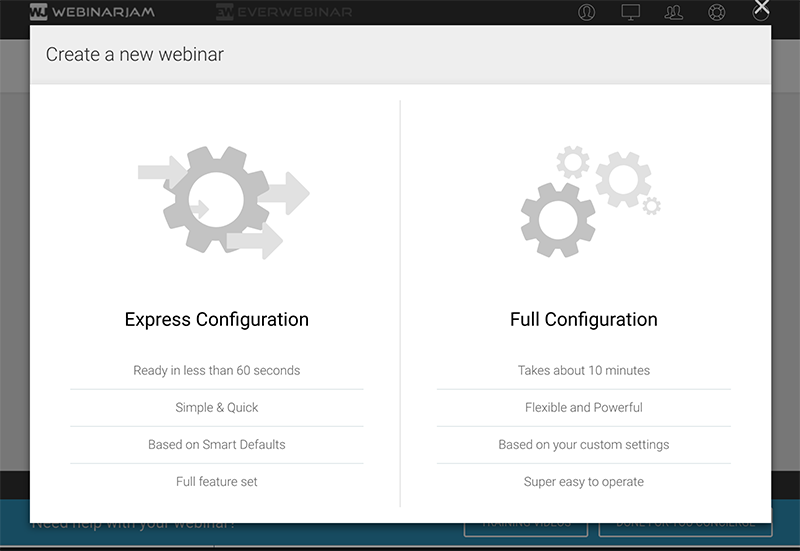
The interface of Webinarjam is super simple to use as you can see in the screenshot below.

Webinarjam Review and Trial Pricing
A Sneak peak at the interface when you activate the Webinarjam Trial

What are the Webinarjam Trial Pricing Details

The 14 Day trial is for only $1 and you can get full access to the entire Webinarjam software that allows you to full access to the software.

This is a real no brainer that can take your business to the next level using webinars without sacrificing quality.

The details of the trial is 14 days for $1 then it rebills at just $499 per year which is a discount for the normal pricing anyway.

That’s why we posted this video review so you can see the ins and outs of the software and how it all works.

Update for 2020:

Recently, the Webinarjam Trial changed the terms of their trial and pricing packages.

With the addition of Webinarjam 4.0 which has many more features and is much easier to use, they rolled out 3 separate pricing packages for anyone that is the beginner to the most advanced of marketers.

The 60 Day Free Trial link is no longer valid.

It’s not a 14 Day Trial for only $1.

Plus you get an additional 30 days to cancel with a money back guarantee.

Click Here to Test Drive Webinarjam for Only $1!


Filed Under: Digital Marketing

  • 1
  • 2
  • Next Page »

Recent Posts

  • Dedicated Servers Explained Plus Pros and Cons
  • Best Email Software – What You Need to Know Before Choosing
  • Lead Generation For Your Blog (How To)
  • How to Fire Your Content Writer And Use AI Software
  • Leads And Conversions- Is It All There Is With Digital Marketing?

Navigation

  • Home
  • Tumblr
  • Blogger
  • WordPress

Copyright © 2026 · Destroyer Experience